Eight Steps to Selecting Health & Safety Software
Rather than looking for a system with a lot of standard reports, I recommend a system that enables you to build your own reports.
HUNDREDS of H&S software applications are available; choosing the one that can best address your needs can be a difficult process. During the past 17 years, I have seen a variety of procedures used to select software. While some have worked brilliantly, others resulted in exorbitant costs and requirements never being met. The purpose of the article is to guide you through the selection process; i.e., to select the one that meets your budget and requirements.
I have distilled the process down into the following eight crucial steps:
1. Define needs and justification.
2. Establish and prioritize requirements.
3. Establish budget and acquire approval.
4. Determine potential solutions.
5. Develop RFI.
6. Select a short list.
7. Conduct vendor demonstration and selection.
8. Purchase.
Define Needs and Justification
Simply stated: "Why are you considering new H&S software?" Is it to move away from a paper system to a database? Is the technology of your existing system obsolete? Maybe your organization or processes have changed and cannot be supported by your existing system. Whatever the case may be, you should document it. When going through this process, keep in mind the cost/benefits of the new system--this will help you gain budget approval.
Example: ACME, Inc. has a need for automating its incident management process. Our paper file system requires significant resources to manage, retrieve and report incident records and statistics. Additionally, currently we can't easily share incident data and lessons learned throughout our company. The new system would greatly reduce the resources needed to track and manage incident data and report statistics to Corporate.
Deliverable: Project scope and justification documented.
Establish and Prioritize Requirements
Now that you have defined your high-level needs, you must get into the details. The most successful software projects begin with a clear list of prioritized items, or requirements.
A team of key H&S professionals and key stakeholders should be formed to define your requirements. I recommend from three to 10 people for the team. A small team helps solicit ideas, but a very large team causes difficulty in establishing consensus on the requirements. Requirements can be broken down into three key categories: functional, technical, and reporting.
 Functional Requirements
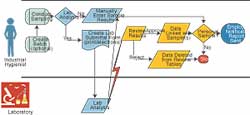
There are many methods for defining functional requirements. The simplest and most effective method utilizes process flow diagrams and a list of requirements. Process flow diagrams are simple to construct, and you can use your standard desktop software to get the job done. Remember to work from the start (always on the left) to the end (always on the right). You simply define each of the steps and interactions between the entities to complete the task at hand.
Once the process flow models are completed for each key function within the scope of the project, detailed requirements can be defined. List the key requirements for each key process identified in your process flow model. I recommend using a spreadsheet to track requirements and enable the sorting and prioritizing. The following rating system has proven to be very effective for setting priorities:
1. Must have
2. Strong want
3. Want
4. Nice to have
Technical Requirements
Do not underestimate the importance of this step! Many software purchases have been based on the "nice look and feel" but failed miserably because of the system's weak technology. I recommend working with your IT group to define your technical requirements. Some items to consider are:
1. Do you need an Enterprise (company-wide) system, or is a PC-Based system sufficient?
2. Are you restricted to use an Oracle, SQL Server or AS400 database?
3. Does the software need to be multilingual?
4. Are Web applications required or desired?
5. If Web applications are required, must they be 100 percent browser-based (i.e., not require anything to be loaded on the PC)?
Reporting Requirements
Do not overestimate the importance of reporting. You and only you know what reports you need out of an application. Rather than looking for a system with a lot of standard reports, I recommend a system that enables you to build your own reports. Your reporting needs consistently will change; you need a system that will change with you.
The only standard reports that should be mandatory are regulatory reports (e.g., OSHA 300, 300a). Document a list of the regulatory reports your business requires.
Deliverable: List of prioritized functional, technical, and reporting requirements.
Establish Budget and Acquire Approval
Before purchasing a house, you typically get pre-approved for a mortgage. The pre-approval process involves looking at what your needs are and what you can afford. The purchasing of software should be the same. It is frustrating for all parties involved that have to invest significant resources during a selection process, only to have the budget not approved.
Items that should be budgeted include: software license, support, implementation, data migration, training, and integration requirements. While you will not know the final costs, you should make estimates. You can get assistance with the estimates from your IT group, through benchmarking, or by utilizing a consultant.
Deliverable: An approved budget for the estimated cost of the software and services required to ensure a successful implementation and proper support.
Determine Potential Solutions
Your first decision should be to build your system in house or to buy a commercial off-the-shelf system (COTS). The "build vs. buy" issue has been studied and reported on for years. It has been found that building your own software requires significantly more resources, funding, and time. The COTS system is significantly less expensive, utilizes fewer resources, and can be implemented immediately.
For purpose of this article, we will assume the decision is to buy a COTS system. Once this decision has been made, a list of potential vendors should be prepared. Many resources are available to find vendors, including:
Review your list of vendors' stated functionality and technology against your requirements to determine a list of prospects.
Deliverable: List of prospective vendors
Develop RFI
A Request for Information (RFI) is a document that is sent to the prospective vendors for the purpose of soliciting their responses to a list of questions. The questions should cover your technical, functional, and reporting requirements. Rely on your purchasing and IT departments or consultant to assist you in the format for your RFI.
The most effective RFIs include a spreadsheet of requirements with columns for the vendors to identify whether their application will:
1. Meet the requirement "out of the box" (standard in application),
2. Meet the requirement as part of implementation, or
3. Will not meet requirement (i.e., customization is required).
Deliverable: The RFI.
Select a Short List
Use the priority ranking you developed with your requirements document to help provide a weighted ranking system. When the responses in the spreadsheet are weighted against your prioritization, a quick determination can be made of the vendors that best fit your needs. Invite the top two to five vendors for detailed demonstrations of their software.
Deliverable: The "Short List" of vendors to invite for demonstrations.
Conduct Vendor Demonstrations and Selection
Give your vendors a target to hit. Develop scenarios based on your process flows for the vendors to demonstrate how they would complete the process using their system. This is commonly called a "Scripted Demo." The scenarios should be sent to the vendors at least one week prior to the demonstration to allow sufficient time for preparation. Be sure to include as much of your key requirements in the scripted demo as possible.
Allow for a Q/A session at the end of the demonstration to ensure all of your questions are addressed or to get clarifications if needed. After each demonstration, your selection team should debrief and summarize key thoughts on the demonstration and rate the vendor's application. After sitting through several demonstrations, the clarity between the vendors' applications begins to get a little fuzzy.
As vendors give their demonstrations, questions may arise that you want to ask the other vendors. Maintain a list of questions to send to the appropriate vendor for its response.
After defining your requirements and observing the demonstrations, it should be clear which vendor best fits your needs. At this point, you should request a list of references to validate your judgment. Checking references earlier in the selection process is not recommended for many reasons. As you soon will be a client of a vendor, you would not want to receive reference phone calls from every prospective client of your vendor. The vendor should respect your privacy and workload and only request your time as a reference when it has been selected as the vendor of choice.
Deliverable: Selected vendor.
Purchase
This is one of the most critical steps in the process. As mentioned earlier, you must maintain communication with your purchasing and legal departments. These departments should have most of the necessary information to move your purchase forward. You should walk your selected vendor through your internal legal reviews and purchasing process, making sure nothing slips through the cracks and that you stay on your timeline.
Summary
Selecting the appropriate software, one that meets your requirements and budget, is a big project. If done properly, the entire process should only take a few months, depending on the complexity and size of your project.
Establish a detailed project plan and assign tasks, responsibilities, and deadlines. Of most importance, monitor your progress and adjust accordingly.
This article originally appeared in the January 2004 issue of Occupational Health & Safety.